

Appearance
Connect your agent
- Start Sumeru and confirm the badge shows running
- On Configure → Connect an agent, pick the key (when you have more than one — see Scoped API keys) and your agent
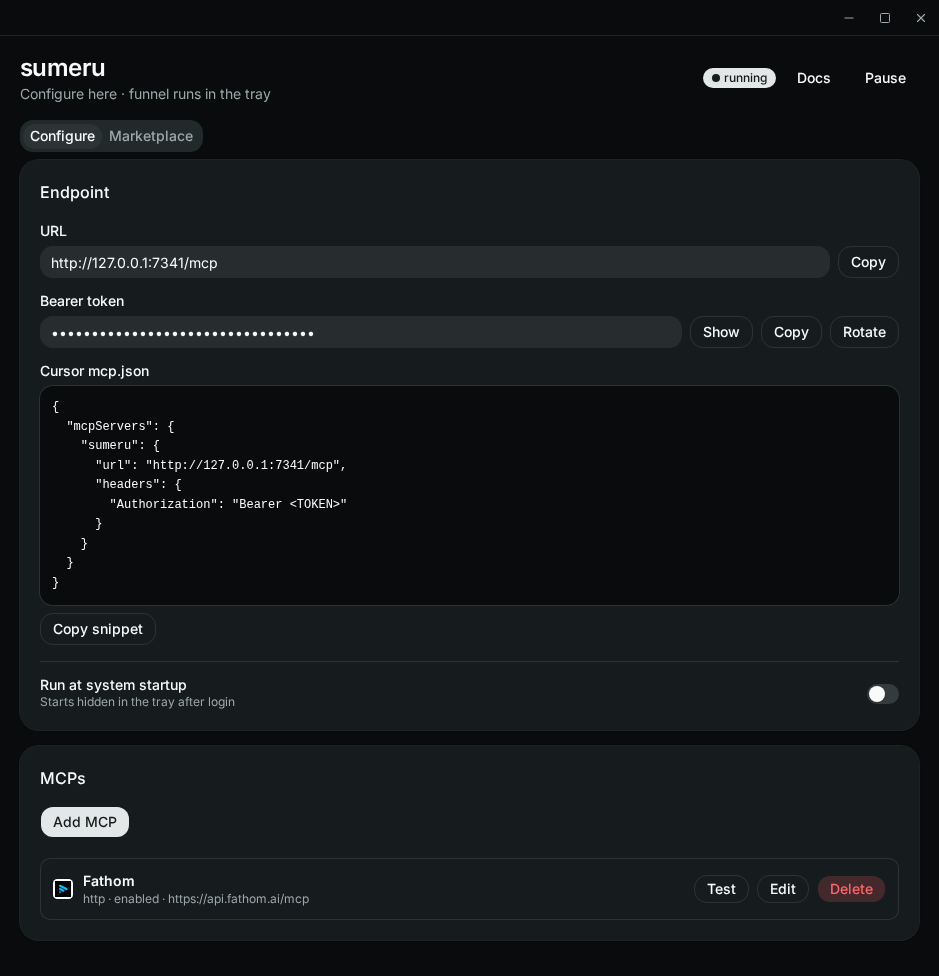
- Install it:
| Agent | How |
|---|---|
| Claude Code | Copy the claude mcp remove …; claude mcp add … command and run it in a terminal (it replaces any existing sumeru entry) |
| Codex | Copy the [mcp_servers.sumeru] table into ~/.codex/config.toml, replacing any existing one |
| Cursor | Click Add to Cursor (or paste the snippet into ~/.cursor/mcp.json) |
| VS Code | Click Add to VS Code (or paste the snippet into your user mcp.json) |
| Gemini CLI | Copy the gemini mcp add … command and run it in a terminal |
| Windsurf | Copy the snippet into ~/.codeium/windsurf/mcp_config.json |
Or let the agent do it: Copy prompt gives a prompt to paste into that agent's chat — it wraps the same command/snippet and asks the agent to install it, keep your other MCP servers, and say whether it needs a restart.
The preview masks the token; Copy, Copy prompt, and Add to … use the selected key's real token. Non-default keys install as sumeru-<key name>, so one agent can hold several. Agents store it in plain text in their config, and the CLI commands also land in your shell history — rotate the token if either leaks.
- Reload MCP servers in your agent and call
list_mcpsto confirm your upstreams appear
After you rotate a key, repeat these steps for that key — agents keep the old token until you do.
Per-repo setup
Switch Connect an agent to This repo to get a config you can commit. It never contains the token; instead it reads it from an environment variable named after the key (SUMERU_TOKEN for Default, SUMERU_<KEY>_TOKEN otherwise):
| Agent | Repo config | Token from |
|---|---|---|
| Claude Code | claude mcp add --scope project … → .mcp.json | ${SUMERU_…_TOKEN} |
| Codex | .codex/config.toml (trusted projects) | bearer_token_env_var |
| Cursor | .cursor/mcp.json | ${env:SUMERU_…_TOKEN} |
| VS Code | .vscode/mcp.json | a password prompt (inputs), stored by VS Code — no env var needed |
| Gemini CLI | gemini mcp add --scope project … → .gemini/settings.json | ${SUMERU_…_TOKEN} |
Windsurf has no project-level MCP config, so it is user-scope only.
Then set the variable where the agent runs — Copy export gives export SUMERU_…_TOKEN=<token>. Put it in a gitignored .envrc (direnv) or your shell profile. Apps launched from the Dock may not see shell variables; start them from a terminal. Pair this with a scoped key so each repo reaches only its MCPs.
Stdio alternative
If you prefer stdio instead of HTTP (JSON agents):
json
{
  "mcpServers": {
    "sumeru": {
      "command": "sumeru",
      "args": ["mcp-stdio"]
    }
  }
}
Codex (~/.codex/config.toml):
toml
[mcp_servers.sumeru]
command = "sumeru"
args = ["mcp-stdio"]
sumeru must be on the agent's PATH (npm i -g sumeru-mcp). Otherwise set command to the app binary itself, e.g. /Applications/sumeru.app/Contents/MacOS/sumeru on macOS or /usr/bin/sumeru from the .deb.